2005年-2023年 专注网站建设18年
qin@xxwq.cn
微信咨询
手机浏览


---------------------------------
-----------------------------------
2023/12/3 14:39:43
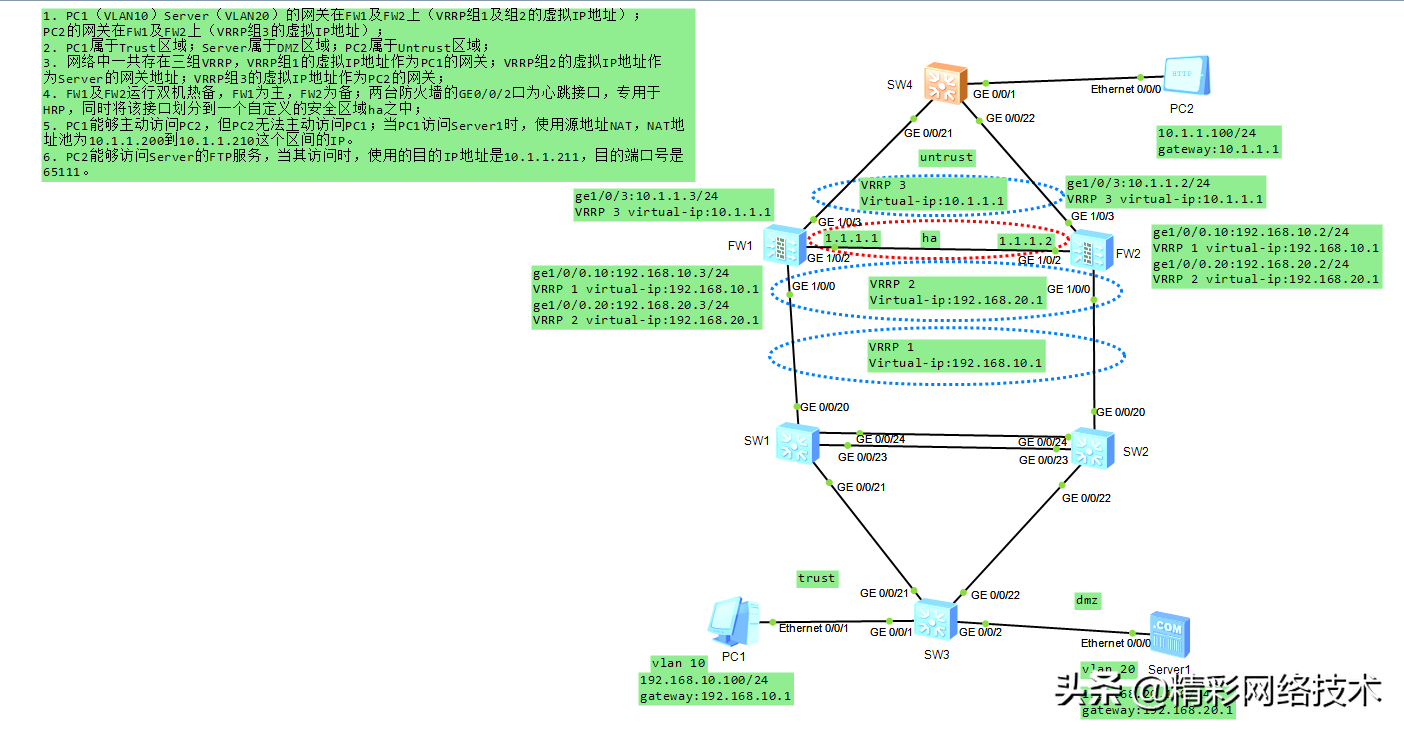
组网要求:
1. PC1(VLAN10)Server(VLAN20)的网关在FW1及FW2上(VRRP组1及组2的虚拟IP地址);PC2的网关在FW1及FW2上(VRRP组3的虚拟IP地址);
2. PC1属于Trust区域;Server属于DMZ区域;PC2属于Untrust区域;
3. 网络中一共存在三组VRRP,VRRP组1的虚拟IP地址作为PC1的网关;VRRP组2的虚拟IP地址作为Server的网关地址;VRRP组3的虚拟IP地址作为PC2的网关;
4. FW1及FW2运行双机热备,FW1为主,FW2为备;两台防火墙的GE0/0/2口为心跳接口,专用于HRP,同时将该接口划分到一个自定义的安全区域ha之中;
5. PC1能够主动访问PC2,但PC2无法主动访问PC1;当PC1访问Server1时,使用源地址NAT,NAT地址池为10.1.1.200到10.1.1.210这个区间的IP。
6. PC2能够访问Server的FTP服务,当其访问时,使用的目的IP地址是10.1.1.211,目的端口号是65111。
一、eNSP详解视频:
重播
播放
00:00/00:00正在直播00:00
进入全屏
点击按住可拖动视频
二、IP设置:
PC1:192.168.10.100/24,vlan10,网关:192.168.10.1
Server1:192.168.20.100/24,vlan20,网关:192.168.20.1
FW1:ge1/0/0.10:192.168.10.3/24,VRRP 1 virtual-ip:192.168.10.1
ge1/0/0.20:192.168.20.3/24,VRRP 2 virtual-ip:192.168.20.1
ge1/0/3:10.1.1.3/24,VRRP 3 virtual-ip:10.1.1.1
FW2:ge1/0/0.10:192.168.10.2/24,VRRP 1 virtual-ip:192.168.10.1
ge1/0/0.20:192.168.20.2/24,VRRP 2 virtual-ip:192.168.20.1
ge1/0/3:10.1.1.2/24,VRRP 3 virtual-ip:10.1.1.1
三、SW3的主要配置文件:
#
sysname SW3
#
vlan batch 10 20
#
interface GigabitEthernet0/0/1
port link-type access
port default vlan 10
#
interface GigabitEthernet0/0/2
port link-type access
port default vlan 20
#
interface GigabitEthernet0/0/21
port link-type trunk
port trunk allow-pass vlan 10 20
#
interface GigabitEthernet0/0/22
port link-type trunk
port trunk allow-pass vlan 10 20
#
return
四、SW1的主要配置文件:
#
sysname SW1
#
vlan batch 10 20
#
stp instance 0 root primary
#
interface Eth-Trunk1
port link-type trunk
port trunk allow-pass vlan 10 20
mode lacp-static
#
interface GigabitEthernet0/0/20
port link-type trunk
port trunk allow-pass vlan 10 20
#
interface GigabitEthernet0/0/21
port link-type trunk
port trunk allow-pass vlan 10 20
#
interface GigabitEthernet0/0/22
#
interface GigabitEthernet0/0/23
eth-trunk 1
#
interface GigabitEthernet0/0/24
eth-trunk 1
#
Return
五、SW2的主要配置文件:
#
sysname SW2
#
vlan batch 10 20
#
stp instance 0 root secondary
#
interface Eth-Trunk1
port link-type trunk
port trunk allow-pass vlan 10 20
mode lacp-static
#
interface GigabitEthernet0/0/20
port link-type trunk
port trunk allow-pass vlan 10 20
#
interface GigabitEthernet0/0/21
#
interface GigabitEthernet0/0/22
port link-type trunk
port trunk allow-pass vlan 10 20
#
interface GigabitEthernet0/0/23
eth-trunk 1
#
interface GigabitEthernet0/0/24
eth-trunk 1
#
return
六、FW1的主要配置文件:
#
sysname FW1
#
hrp enable
hrp interface GigabitEthernet1/0/2 remote 1.1.1.2
#
interface GigabitEthernet1/0/0
undo shutdown
undo service-manage enable
#
interface GigabitEthernet1/0/0.10
vlan-type dot1q 10
ip address 192.168.10.3 255.255.255.0
vrrp vrid 1 virtual-ip 192.168.10.1 active
service-manage ping permit
#
interface GigabitEthernet1/0/0.20
vlan-type dot1q 20
ip address 192.168.20.3 255.255.255.0
vrrp vrid 2 virtual-ip 192.168.20.1 active
service-manage ping permit
#
interface GigabitEthernet1/0/1
undo shutdown
#
interface GigabitEthernet1/0/2
undo shutdown
ip address 1.1.1.1 255.255.255.0
#
interface GigabitEthernet1/0/3
undo shutdown
ip address 10.1.1.3 255.255.255.0
vrrp vrid 3 virtual-ip 10.1.1.1 active
#
firewall zone local
set priority 100
#
firewall zone trust
set priority 85
add interface GigabitEthernet1/0/0.10
#
firewall zone untrust
set priority 5
add interface GigabitEthernet1/0/3
detect ftp
#
firewall zone dmz
set priority 50
add interface GigabitEthernet1/0/0.20
#
firewall zone name ha id 4
set priority 90
add interface GigabitEthernet1/0/2
#
firewall detect ftp
#
nat server 0 zone untrust protocol tcp global 10.1.1.211 65111 inside 192.168.2
0.100 ftp
#
nat address-group 1 0
mode pat
section 0 10.1.1.200 10.1.1.210
#
security-policy
rule name TtoU
source-zone trust
destination-zone untrust
source-address 192.168.10.0 mask 255.255.255.0
action permit
rule name UtoD
source-zone untrust
destination-zone dmz
destination-address 192.168.20.100 mask 255.255.255.255
action permit
rule name TtoD
source-zone trust
destination-zone dmz
destination-address 192.168.20.100 mask 255.255.255.255
action permit
#
nat-policy
rule name TtoD
source-zone trust
destination-zone dmz
source-address 192.168.10.0 mask 255.255.255.0
destination-address 192.168.20.100 mask 255.255.255.255
action source-nat address-group 1
#
return
七、FW2的主要配置文件:
#
sysname FW2
#
hrp enable
hrp interface GigabitEthernet1/0/2 remote 1.1.1.1
#
interface GigabitEthernet1/0/0.10
vlan-type dot1q 10
ip address 192.168.10.2 255.255.255.0
vrrp vrid 1 virtual-ip 192.168.10.1 standby
#
interface GigabitEthernet1/0/0.20
vlan-type dot1q 20
ip address 192.168.20.2 255.255.255.0
vrrp vrid 2 virtual-ip 192.168.20.1 standby
#
interface GigabitEthernet1/0/1
undo shutdown
#
interface GigabitEthernet1/0/2
undo shutdown
ip address 1.1.1.2 255.255.255.0
#
interface GigabitEthernet1/0/3
undo shutdown
ip address 10.1.1.2 255.255.255.0
vrrp vrid 3 virtual-ip 10.1.1.1 standby
#
firewall zone local
set priority 100
#
firewall zone trust
set priority 85
add interface GigabitEthernet1/0/0.10
#
firewall zone untrust
set priority 5
add interface GigabitEthernet1/0/3
detect ftp
#
firewall zone dmz
set priority 50
add interface GigabitEthernet1/0/0.20
#
firewall zone name ha id 4
set priority 90
add interface GigabitEthernet1/0/2
#
firewall detect ftp
#
nat server 0 zone untrust protocol tcp global 10.1.1.211 65111 inside 192.168.20.100 ftp
#
nat address-group 1 0
mode pat
section 0 10.1.1.200 10.1.1.210
#
security-policy
rule name TtoU
source-zone trust
destination-zone untrust
source-address 192.168.10.0 mask 255.255.255.0
action permit
rule name UtoD
source-zone untrust
destination-zone dmz
destination-address 192.168.20.100 mask 255.255.255.255
action permit
rule name TtoD
source-zone trust
destination-zone dmz
destination-address 192.168.20.100 mask 255.255.255.255
action permit
#
nat-policy
rule name TtoD
source-zone trust
destination-zone dmz
source-address 192.168.10.0 mask 255.255.255.0
destination-address 192.168.20.100 mask 255.255.255.255
action source-nat address-group 1
#
return
八、验证结果
1、PC1能正常ping通PC2。
PC>ping 10.1.1.100 -t
Ping 10.1.1.100: 32 data bytes, Press Ctrl_C to break
From 10.1.1.100: bytes=32 seq=1 ttl=126 time=78 ms
From 10.1.1.100: bytes=32 seq=2 ttl=126 time=62 ms
From 10.1.1.100: bytes=32 seq=3 ttl=126 time=78 ms
--- 10.1.1.100 ping statistics ---
3 packet(s) transmitted
3 packet(s) received
0.00% packet loss
round-trip min/avg/max = 62/72/78 ms
2、在SW3——SW1——FW1——FW4的链路上断开,PC1能够正常Ping通PC2。
3、PC2可以通过ftp 10.1.1.211:65111访问Server1的ftp服务。
4、PC1访问Server1时是转换成10.1.1.200至10.1.1.210的ip地址后访问server1的
HRP_M[FW2]dis firewall session table
2021-01-22 05:15:08.660
Current Total Sessions : 9
icmp VPN: public --> public 192.168.10.100:24671[10.1.1.208:2056]--> 192.168
.20.100:2048